American 2748: Seattle to Dallas Fort Worth

진짜 오랜만에 타보는 American Airlines Seattle to Dallas 🙂 옛날에 T-Mobile에서 일하던 시절엔 Dallas 출장시에는 무조건 이걸 타야하는 정책도 있어서 많이 타던 노선이다.

그 당시에는 개인적으로 대한항공에 milage를 몰빵했던 시기라 다른 항공사에서 환승해가며 다른 비행기도 타보려 했었는데…. 암튼 근 십몇년 만에 타게 되었다… 이제는 Alaska에 몰빵하는 세월이라 Oneworld 비행기를 일부러 골라 탔다…

문제는 일요일 아침 Seattle에서의 첫 비행기 – 진짜 12시 좀 넘어 출발하는 red eye들을 제외하면 이 날의 공항 첫 이륙이다….AM 5:24 출발 ㅎㄷㄷ

결국 이번 여정은 국제선을 타야하는 일정이라 대충 AM3:00 이전에 checkin을 해야해서 결국 잠을 포기하고 새벽에 공항에 가서 대기하다 (가장 일찍여는 coffee shop booth앞에서 졸다가 뭐 하나 그 가게 직원들 출근하는거 다 구경하고 사드심…ㅎㅎ) 병든 닭마냥 공항에서 졸다가 DFW에 도착했다..

Took the first flight from Seattle to fly to Dallas 🙂 – and this touched my memory lane of travelling to Dallas with AA during the days I worked for T-Mobile…

2025.8

T-Mobile Park

아주 옛날 T-Mobile에서 일할 당시 맨날 건의 올렸던 게 MLB 혹은 야구 Sponsorship이었는데 회사도 떠나고 강산이 거의 두 번 바뀔때 쯤 그 당시에 이야기했던 게 현실이 되었다.

그리고 동시에 막연히 이야기했던 “본사가 Mariners 홈구장에서 10분인데 왜 여기 구장 스폰서를 못할까”했던 것도 어느새 이루어져 Safeco Field가 T-Mobile Park으로 바뀐지도 몇 년이 되었다.

암튼… 그간 한번도 방문 못하다가 우연히 애들 ticket이 생기고 해서 drop off해주고 pickup해주러 가는 길에 야구장 앞을 서성인 기회가 있었다…

KGJ가 처음으로 여기 구장을 방문하던 주에 시애틀에 이사 온 게 어여 18년전…. 이제 KGJ는 동상도 만들어졌네…. 🙂 – 오래된 Seattle 야구팬들은 이 구장이 없어질 위기에 있던 MLB팀에 활력을 불어넣어줬던 KGJ가 지어준 거라 믿는다…

This place has connection with my personal histories….

In the old days when I was working for T-Mobile, we always asked the leadership to consider sponsoring baseball or MLB and even asked why not purchasing the naming rights of ‘Safeco Field’ – home of Seattle Mariners which is 10 min drive from T-Mobile US’ HQ.

After almost a two decade, both happened although I left for other business 🙂 and this summer I had the fortune to visit this “T-Mobile Park” to pick up my son and his friends 🙂

Also, near the home plate entrance now there is a statue of KGJ who visited this field for the first time at the week we moved to Seattle 🙂 – and old Seattle baseball fans still believe this new ballpark is a gift from KGJ 🙂

2025.8

Xbox Game Pass

gamepass.PNG

Xbox Game Pass

This was the one kept me busy during last 2-3 months – finally came to earth at late of last month.

Anyone in US using T-Mobile can get 1 month of free service with T-Mobile Tuesday – need to redeem by end of day though.. My old job meets my current job.. 🙂

최근 몇달간 ( 그리고 아직도..:)) 나를 괴롭혔던 서비스가 드디어 개시된지도 대략 3주… 자꾸 신생아의 발톱을 보고 애가 어른이 될 때 발싸이즈가 얼마나 될지를 물어보는 사람들이 많아 괴롭다..ㅋㅋㅋ

미국에서 T-Mobile을 쓰는 사람중 Xbox One이 있는 사람은 “”오늘(6/13)”” T-Mobile Tuesday에 한달 무료 코드가 떴으니 어여 무료 감상하시얍….

2017.6


Interesting conversation with T-Mobile Retail Store Rep

Well.. it was a funny discussion – “know your enemy if you are trying poke something”..

I went to T-Mobile store at company’s campus and this is how the conversation went..

Me: I want to add 2 lines on my account

Rep: How long will you have it?

Me: not sure but maybe 2-3 months for the visitors?

Rep: Then, why don’t you go with prepaid with $50 per line?

This was the moment I felt this guy was trying to make crap out of me, but I smiled (nice and reasonable try so far..)

  • $20 for 2 line with basic data vs $100 for similar (maybe more data?)
  • Well, obviously I am on Microsoft discount plan and I am clever enough to know prepaid doesn’t qualify for that while my postpaid gets discount..

Then, this guy threw another bomb – and started to make me think the integrity of this guy – at me by saying if I go to prepaid he can waive the activation fee.

  • Well I am again clever enough to know there is no activation fee in Prepaid
  • BTW there is no Activation fee at all maybe just SIM kit fee
  • He said it is hard to get 2 lines cancel after 3 month and you need to have the line active for 120 days.. WTF – this is so 90s tactic done by spooky dealers I knew in past..

So, I was wondering whether I should reveal my background or shout back to his bullshit that he is talking commission charge back. Anyhow I simply started at him for a moment & other reps…and everybody was avoiding my eye contact. Boy you chose a wrong person to play with – Trust me I was living and dying with how the comp works when at my old days at T-Mobile.. haha 🙂

Then, as a last another bomb which I just found at very last min and he didn’t tell me on data plan

Rep: sign everything over there

Me: (was reading all the details) Wait how about the data?

Rep: It is 6G with $15 per line..

Me: What? I want the free plan that will be enough

Rep: That is retired so you need to be on 6GB

So, I was feeling terrible at this moment – but just signed and paid the SIM cost and walked out. Then, made a call to customer care and changed to the plan I originally wanted (which he never checked with me)

Maybe I looked dumb Asian not knowing what I am up for, but the most crazy thing is this all happened at the Microsoft campus store. I totally cannot believe this as a proud alumni of the company…?! BTW I checked & remember your name on the badge..

사기를 칠려면 상대를 보고 사기를 치세요… 참나…내가 나름 그 회사에서 영업 보상 체계/Sales Rep 정책을 몇년동안 한 사람인데 쌍팔년도 딜러들이 사기쳐 먹던 방식을 써먹는 Sales Rep이 있어 한대 칠려다 말았다…아직 아는 사람들도 많은데 확 reporting해버릴까?

아니면 지금 T-Mobile CEO twitter에 써버릴까?ㅎㅎㅎ (티워터 매니아임..)

2016.6


LG V10

WP_20151208_005

After 2 years and 9 months of Windows phone journey, back to Android – but trying my best effort not to donate everything to evil company though.

Other than one scary blue screen, looks good – had to install a lot of Apps again with scratching my head to bring back memories 🙂  Starbucks, Mint, Office, Nest, Chase – Ah I can do mobile banking again!!!

Phone design looks decent especially

  • Dual screen experience is better than I thought – pretty useful actually (finding where to set up is hard :))
  • Pointer finger/backside button control – This was originally tried by Motorola in years before and adopted by LG in recent models, but

존경하지 마다않는 모 형님께서 테스트용으로 하사해주셔서 거의 3년만에 안드로이드로 복귀(?) 했다. 뭐 Win10폰은 정말 훌륭하게 보였지만, 공식 release는 at&t만 나오는 관계로 나랑 상관 없겠구나라고 생각할 때 하사를 받아 전격 이동.. 🙂

정말 아름답게 만든 폰인듯… 듀얼스크린은 – 아무도 기억 못하겠지만 예전에 dual screen display는 있었음 (LG Flip Smartphone)… – 어려운 숙제를 어쨌건 해결해서 제출한 분위기이나 생각보다 괜찮음..

한가지 아쉬운건 카메라 버튼은 있는게 좋지 않을까란 생각을 해봤음…

2015.12

Samsung Galaxy Note 3

WP_20131210_002

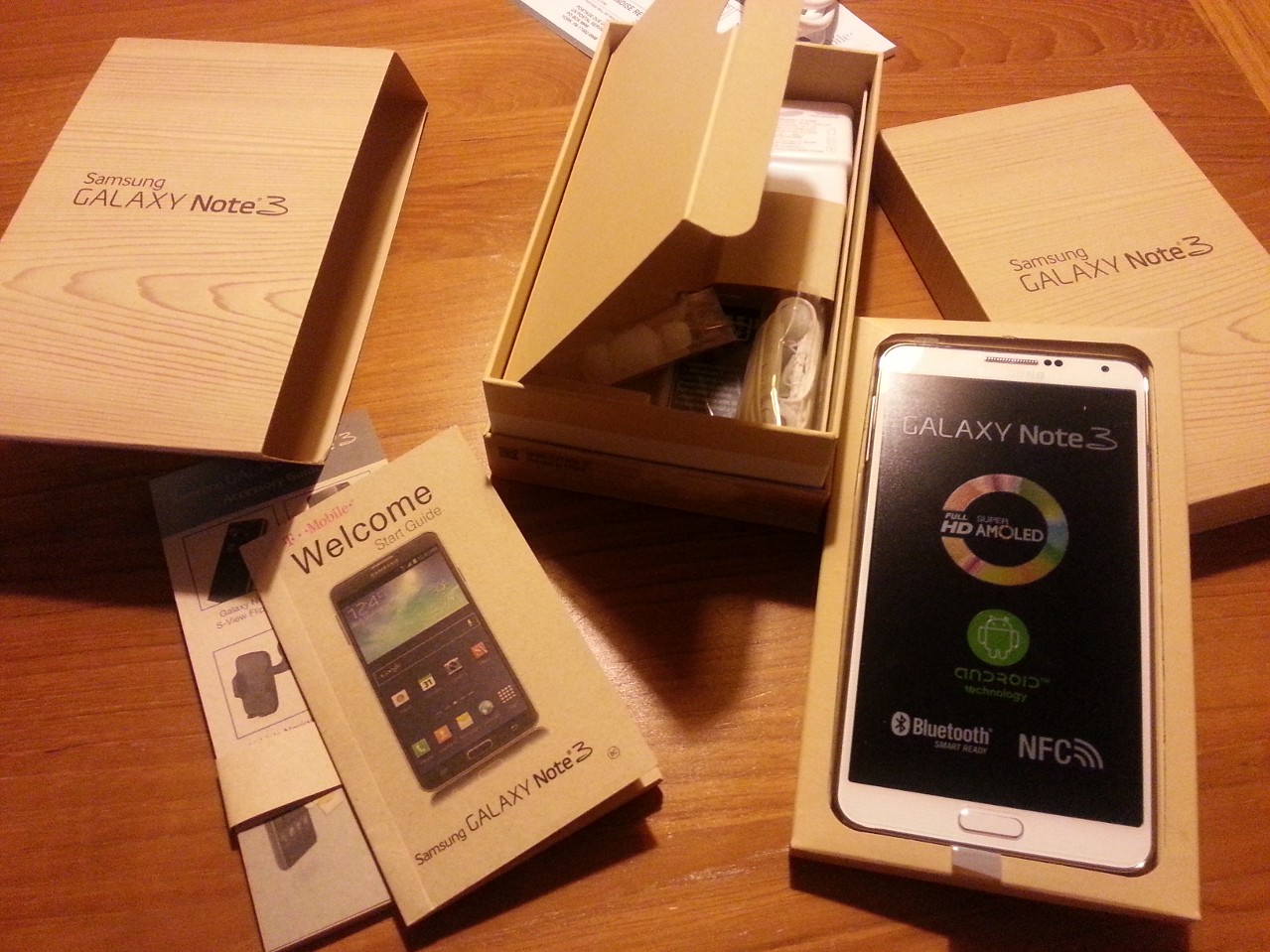
Finally, bought Galaxy Note 3. Amazing devices, and 30 min of work to set up for my wife made my lovely ATIV S look so tiny and old-fashioned..

Beautifully designed sold square look and fast processer with tons of software loaded into. Feels like some of the softwares are still useless but I do see Samsung’s effort to differentiate the device with lots of nice softwares/applications. (i.e Galaxy to Galaxy migration app worked beautifully smooth..)

Anyhow, the take for me was – now I got a “small android ablet” called Samsung Galaxy 1 in my hand… 🙂

2013.12

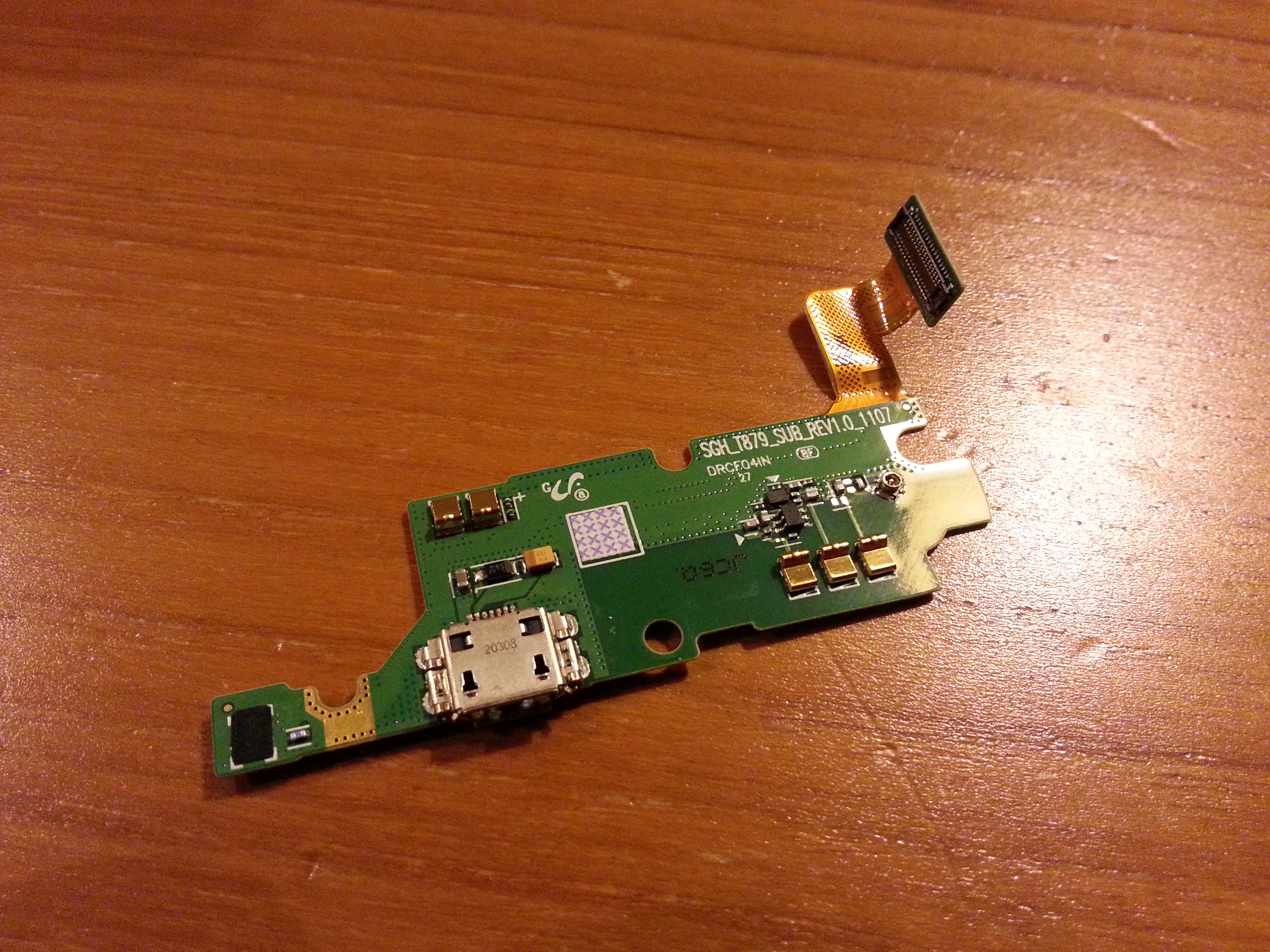
Samsung Galaxy Note: DIY Replacing USB Charging Port

WP_20130508_001 WP_20130508_003

So couple of days ago, my wife’s Galaxy Note was broken – whatever charging cable we tried, the phone hardly get charged – the only case it got charged was when I pulled the charging cable to extream southeast.. It was painful and inconsistent and not a sustainable way.. -_-;

So after some research, I found out, 1) this is not the problem of us only, and we had tons of folks who went thru this process, and 2) some folks do sell USB charging port modules on eBay.. The challenge was finding out the right part for Tmobile version of Note 1 – which is an extreme rare.. (it only sold for a short period with limited quantity)

Luckily enough I was able to order one from eBay, and followed all the directions from the youtube video below

– Open 9 screws at the back

– Open the surrounding cover (so painful!)

– Open 3 screws at the bottom and detach one module

– Open 2 screws at the mainboard

– Detach 6 connection cable points & 1 white line connection point & pull out mainboard

– Detach the white line connection from Charging port module

– Pull out the charging port & reconnect the line connection & all other cables and put back the screws and covers.

The biggest challenge was peeling out the surroundings case because I didn’t have that fancy plastic tool shown in video but I only have my nails as something similar (ouch!!)

With 1st try, it seemed working at first, but power supply seemed to be not feeding into battery.. so…after some thoughts .. I reopened it with hands & nails again (Ouuuuuuuuuuuuuuuuuch!!!!), and found out the cable connecting charging port module to mainboard was not clipped properly.. 😦

Finally, rework after work, finally the galaxy note is back to its life.. 🙂

Gamble of $20 +pain in nails saved me $500.. but thinking this might have been done at one of the Samsung’s service center in Seoul with cheap service fee made me feel sad that I live across the ocean… I do miss that convenience…

Thank you eBay (and who sold this) & Youtube (and the person who shared the video)!

2013.5

T-Mobile LTE!

Has been noticing LTE mark showing up on my new phone about a week or two ago when the bus passes Factoria in Bellevue, and as the spot was very limited, and obviously looks like there are some handover issues between networks – wasn’t able to connect smoothly and do the real test on how LTE works on phone in running buses.

Finally, had a chance to do the quick test at QFC factoria.. it is much faster than HSPA+… and my new phone gets it well so my fingers are crossed for quick expansion/stablization of LTE network

LTESpeedtest

2013.4